Workspace Consulting

Designing a Desk Environment That Supports Your Work

Your office setup influences how you work across an entire day. We offer educational guidance on arranging furniture, managing cables, and creating zones that support focus and comfortable posture — without clinical assessment or medical recommendations.

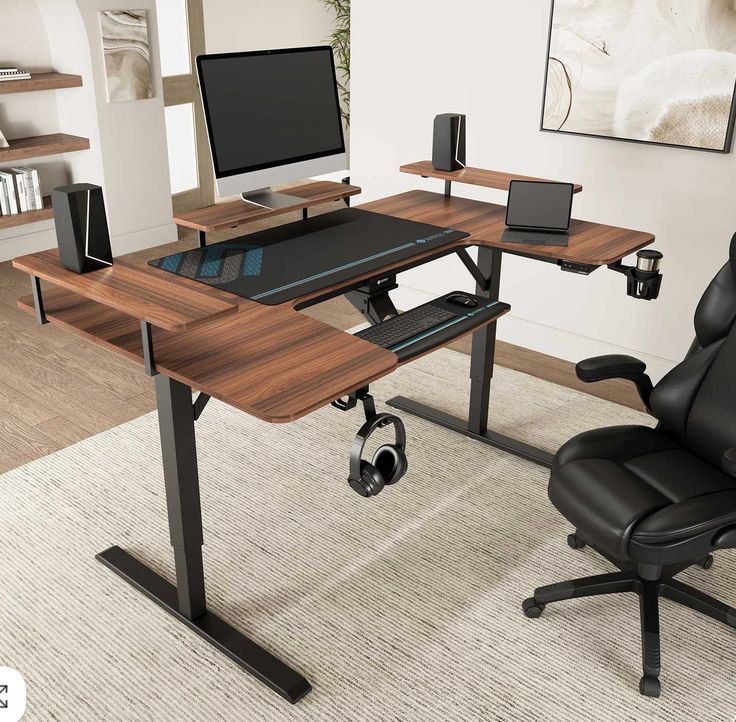
Ergonomic desk arrangement with adjustable monitor arm, keyboard tray, and supportive office chair

The guidance on this page is general and informational only. It does not replace professional ergonomic assessments required by employers, insurers, or occupational health regulators in New Zealand. We do not evaluate medical conditions. Individual workspace needs vary.

Review Framework

What We Observe During a Workspace Review

Our consulting approach examines the interaction between your body, your tools, and your environment — without making assumptions about your physical condition.

Spatial Dimensions

Desk depth, knee clearance, and reach zones for frequently used items.

Visual Environment

Screen brightness, glare sources, and document placement relative to your monitor.

Ambient Conditions

Airflow, temperature consistency, and noise levels that may affect concentration.

Desk Setup

Foundational Principles for a Supportive Work Surface

Monitor Positioning

Place your primary screen at roughly arm's length, with the top edge at or slightly below eye level. This reduces the tendency to lean forward or tilt your head downward during extended reading tasks. If you use dual monitors, position the most-used display directly ahead and angle the secondary screen inward.

Keyboard and Input Devices

Keep your keyboard close enough that your elbows rest near your sides at roughly a 90-degree angle. Wrist rests can provide support during pauses but should not be used while actively typing. Consider the size and shape of your mouse relative to your hand to avoid excessive gripping.

Document and Reference Materials

When referencing printed materials alongside a screen, use a document holder positioned between the keyboard and monitor. This minimises repeated head turning and helps maintain a more neutral neck position during data-entry or comparison tasks.

Seating Guidance

Working With the Chair You Already Have

Before recommending new equipment, we focus on adjusting your existing chair. Most office chairs offer height, tilt, and lumbar support settings that remain underused.

Seat height should allow your feet to rest flat on the floor or a footrest, with thighs roughly parallel to the ground. Backrest angle can be set to support an upright posture during focused work and a slightly reclined position during reading or calls.

We discuss how alternating between sitting and standing — if a height-adjustable desk is available — can introduce variety into your posture throughout the day.

Height Adjustment

Align seat pan so knees are level with or slightly below hips.

Lumbar Contact

Position backrest curve to meet the natural inward curve of your lower back.

Armrest Use

Set armrests so shoulders stay relaxed, not elevated, during typing.

Position Changes

Shift posture every 20–30 minutes to distribute load across muscle groups.

Lighting

Balancing Natural and Artificial Light Sources

Window Placement

Position your desk perpendicular to windows when possible to reduce direct glare on your screen. Use adjustable blinds to modulate incoming daylight throughout the day.

Task Lighting

A dedicated desk lamp with adjustable colour temperature can supplement overhead lighting during detail-oriented work. Warm tones may feel more comfortable during evening hours, while cooler tones can support alertness during morning sessions. Avoid placing lamps directly behind your monitor where they may create reflections.

Movement Breaks

Integrating Short Pauses Into Your Work Rhythm

Brief movement intervals can refresh your attention and introduce physical variety without requiring a gym visit or special attire.

Gently roll shoulders backward, tilt your head side to side, and take three slow breaths. This brief reset can be done seated and serves as a reminder to notice your posture and take a pause from static sitting.

Walk to a water station, step outside for fresh air, or pace a hallway. The goal is to change your visual focus and move major joints through a fuller range of motion.

If you have a height-adjustable desk, alternate between sitting and standing in 30-minute blocks. Use a footrest or anti-fatigue mat during standing periods to distribute weight evenly.

Team Programs

Group Workshops for Shared Workspaces

Organisations in the Wellington region can arrange on-site or virtual workshops tailored to their office layout and team size.

Introductory Session

A 60-minute overview covering desk basics, common setup mistakes, and a guided self-assessment exercise for each participant.

Department Deep Dive

A half-day workshop including individual desk reviews, group discussion, and a written summary of team-wide observations.

Quarterly Refresh

Recurring sessions to revisit habits, introduce new team members, and address workspace changes after office moves or equipment upgrades.

Office FAQ

Further Questions About Workspace Guidance

We discuss general features to look for — such as adjustability, seat depth, and lumbar support — rather than endorsing particular brands. Product choices depend on your budget, body dimensions, and personal preferences.

Yes. Remote workers throughout New Zealand can book video-based reviews. We guide you through measuring and photographing your setup so we can provide relevant observations.

Start With a Workspace Conversation

Tell us about your current desk setup and we will outline suitable consulting options, fees, and session format. No obligation to proceed.

Contact Our Team